Personal OS: the operating system for your life
Your health, your money, your goals, run with AI. A few folders and one file, set up in an hour.
Most people use AI like a vending machine. Ask a question, take the answer, close the tab. Tomorrow it has forgotten you again.
A personal AI operating system fixes that. It isn’t an app you buy. It’s a setup: a few folders and one file, so the AI knows your life and gets a little better every week.
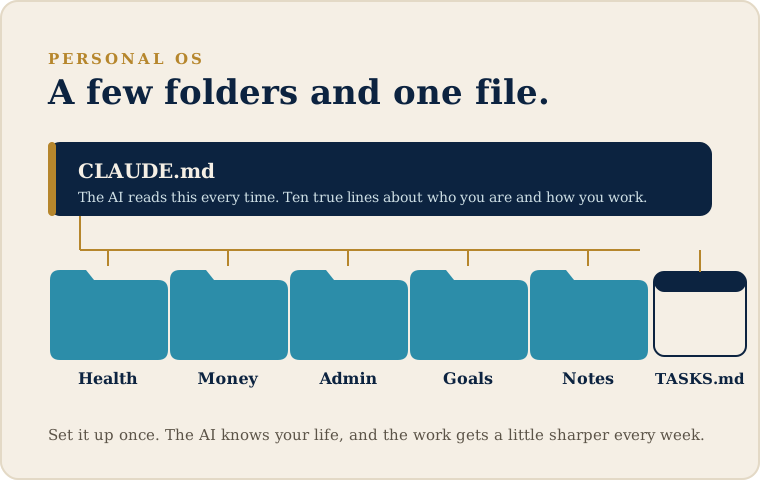
Here’s the whole thing. Give it an hour this weekend.
1. Make five folders (10 min)
In a Claude Project, or just on your computer, create:
- Health
- Money
- Admin
- Goals
- Notes
That’s your life, roughly. Don’t overthink the names.
2. Write one file: CLAUDE.md (15 min)
At the top level, make a plain text file called CLAUDE.md. The AI reads it automatically, every time. Ten true lines is enough:
I'm [your name], based in [your city]. I run my work and my personal life from one system.
I write in short, plain sentences. No jargon.
For anything with numbers, show your working.
Ask me one question before a long answer.
My folders: Health, Money, Admin, Goals, Notes.
3. Drop in your real stuff (15 min)
Put actual things in the folders. Last month’s statement in Money. This year’s goals in Goals. A note about your training or your health in Health. Real beats tidy.
4. Add a TASKS.md (5 min)
One file, the things on your plate. Let the AI read it and keep it updated.
5. Run it (15 min)
Open a session and ask for something real. “Read my Money folder and tell me where I’m leaking.” “Turn my goals into a plan for July.” Watch it use what you actually gave it.
That’s a personal AI operating system. The work lives in the system, not in your head, and it compounds. Next week it’s a little sharper, because it remembers.
Tomorrow I’ll share the Work OS version, the same idea pointed at your business.
And if you’d rather skip the hour, I’ll set the whole thing up with you in one sitting. I call it a Life OS install. But the guide above is yours, free. Start there.
Free starter kit. The five folders and the fill-in CLAUDE.md from this guide, pre-built. Download the Personal OS kit.
If you read this far
Two things you could do next.
Get one short letter like this in your inbox, every Tuesday morning.
Your email stays with me. Unsubscribe in one click.
Rather have it set up for you than piece it together yourself?
Free, 30 minutes. No obligation.